The advent of highly capable and often free AI tools has fueled a new type of lucrative online business: the AI sleepy video business. This model involves using Artificial Intelligence to generate long videos, typically two or more hours in length, focused on niche topics. These videos feature a relaxing or soothing AI-narrated voice and are designed for listeners who want background noise while doing chores or are listening as they fall asleep.
This business model is attracting attention due to its shockingly rapid monetization and significant income potential, often run as a one-person operation with zero employees.
The Shocking Potential for Profit
Two key factors make this business model particularly disruptive: the speed of monetization and the high revenue potential.
Insanely Fast Monetization
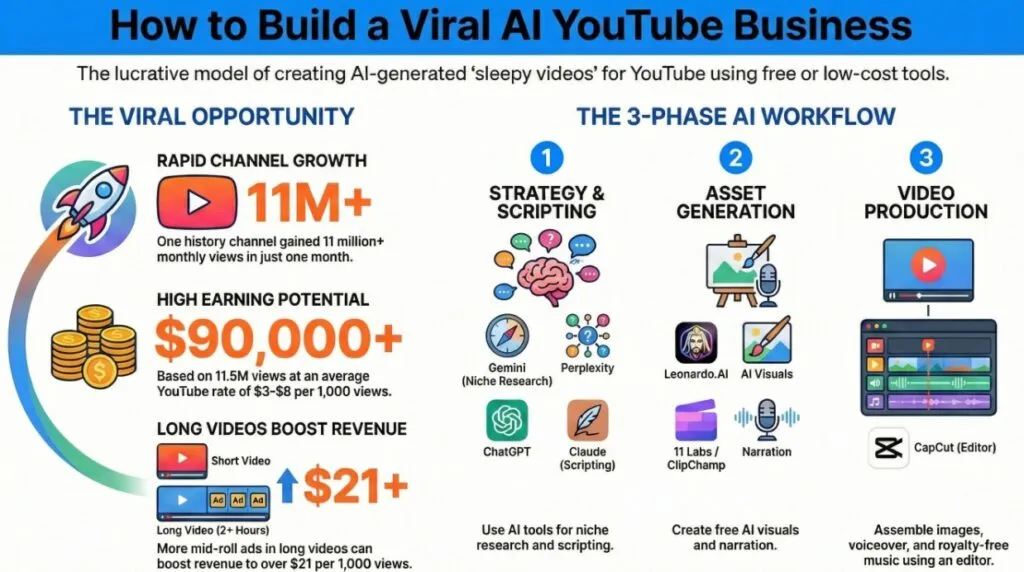
Many of these channels are getting monetized “insanely fast”. YouTube requires 1,000 subscribers and 4,000 watch hours for monetization. Channels discussed in the sources, such as those focusing on philosophy/psychology, science, or medieval history, have demonstrated rapid growth. For example, one channel focusing on medieval history gained over 11 million monthly views just one month after starting and hit YouTube’s monetization requirements within days of going viral.
High Revenue Per Mille (RPM)
While the average YouTube monetization rate tends to be about $3 RPM to $8 RPM (revenue per 1,000 views), long-form sleepy videos often achieve much higher rates. This high earning potential stems from the ability to incorporate midroll ads—the longer the video, the more ad breaks can be included.
- A video creator making lore videos for role-playing games shared that they earned $21.51 on average per 1,000 views. They gained over 472,000 views in three months, earning just over $10,000.
- Applying the average RPM range ($3 to $8) to a channel with 11.5 million monthly views estimates an income of $34,000 to over $90,000 for the month.
- The “Sleepy Historian” channel, having gained over 31 million views in six months, is estimated to have earned over $650,000 if it maintained a similar high RPM rate.
Step-by-Step AI Workflow: Creating a Sleepy Video
The entire process, from niche research to video export, can be completed using a workflow of free or highly affordable AI tools.
Step 1: Niche Discovery and Market Gap Analysis
The goal is to find a video topic that has the potential to draw hundreds of thousands, if not millions, of views, while having very little competition. Making a video on a generic popular topic risks it getting lost in the crowd.
- AI Tool: Gemini (Google’s free version of ChatGPT). Because Google owns YouTube, Gemini has access to YouTube’s data.
- Method: Ask Gemini to search YouTube for popular subniches within a general topic that are receiving at least 500,000 views.
- Example: While “relaxing Bible facts to sleep to” is popular and saturated, asking Gemini to search for popular subniches revealed “archaeology”. A subsequent YouTube search for “relaxing facts about Bible archaeology” showed no results, indicating an untapped topic. This strategy can be applied to any niche, such as psychology (e.g., no one has made sleepy videos about the psychology behind learning skills fast, despite the subniche being popular).
Step 2: Scriptwriting Using Three AI Tools
A combination of three AI tools is used to gather facts, structure the flow, and write the final script.
- Fact Gathering (Perplexity):
- Tool: Perplexity, an AI-powered search engine.
- Purpose: Perplexity searches the internet for answers and displays its sources, which helps reduce hallucinations and allows for easy verification of information.
- Action: Prompt Perplexity repeatedly to find facts on the chosen niche (e.g., 10 facts at a time) until enough material is gathered (e.g., 100 facts).
- Story Structuring (ChatGPT):
- Tool: ChatGPT (Free version is suitable).
- Purpose: While any chatbot can be used, ChatGPT is currently the most consistent at efficiently sorting through data.
- Action: Upload the gathered facts (as a document file) and instruct ChatGPT to reorder them to flow in a more engaging, story-like way.
- Script Generation (Claude):
- Tool: Claude (A competitor to ChatGPT).
- Purpose: Claude is trained to prioritize being helpful and honest, resulting in more natural and engaging writing than ChatGPT.
- Action: Give Claude context about the video/script, then paste segments of the reordered facts and ask it to expand them into script segments (e.g., 12 to 15 minutes of script at a time). The entire script creation process can take less than an hour.
Step 3: Generating Visuals (AI Art)
Viral sleepy videos demonstrate that a high volume of unique images is not necessary. Some successful 2-hour videos have used only three images throughout, while others cycle through about 28 images every eight minutes.
- AI Tool: Leonardo AI (Used in the tutorial because it provides daily free credits, allows commercial use of generated images, and does not add a watermark).
- Action: Create a free account, select the option to generate an image, ensure the output is in widescreen, and provide a prompt describing the desired image. Leonardo AI typically generates four images by default.
Step 4: Voice-over Generation (Relaxing AI Voice)
The voice-over must be narrated by a relaxing or soothing AI voice. Creators have three main options for generating the audio:
| Tool | Cost/Access | Pros | Cons/Notes |
|---|---|---|---|
| ClipChamp | 100% Free | Microsoft’s video editor with a built-in text-to-speech feature. Allows adjustment of voice pitch and speed (slowing it down makes it more meditative). | Requires generating the voice-over in chunks, making the process slow for a 2+ hour video. |
| Cap Cut | Sort of Free (Pro account required, ~$10/month, 7-day trial available) | Popular AI-powered video editor; allows up to 10,000 characters (about 10 minutes) per generation. Voices can be filtered for commercial use. | Requires generating the voice-over in chunks, making the process slow. |
| 11 Labs | Subscription Required (Free trial available) | Considered the golden standard for professional AI voices because it is fast. Can upload the entire script and generate it as a single audio file (e.g., a 2 hour 46 minute script took only 11 minutes). Offers convenient voice sections (like the “meditative voice section”). | Requires a paid plan for commercial licensing if you intend to monetize the video. |
Step 5: Video Editing, Music, and Export
Basic video editing is required to assemble the visual and audio elements.
- Editing Software: Any powerful editor that can handle long video exports is suitable (e.g., open-source Da Vinci or desktop Cap Cut). ClipChamp is not recommended for long videos.
- Assembly: Upload the AI voice-over file(s) onto the video editing timeline. Then upload the AI images and extend them on the timeline (e.g., setting each image to play for 20 seconds creates an 8-minute slideshow). Transitions and filters can be added between images for visual interest.
- Background Music: Download a long, royalty-free meditative music track from a site like Pixabay.
- Crucial Tip: Avoid music tracks that feature a digital fingerprint symbol, as this means the original creator will often claim the ad revenue for any video that uses the song, and the video maker will not earn the money.
- Final Export: Drag the song onto the timeline, use the volume slider to make the music quiet, and copy/paste the song to cover the entire video duration. When exporting the final large file, H.264 compression is recommended.
Creating these long-form AI videos is like building a pipeline for passive income. By putting in the effort to assemble the AI workflow (the plumbing and the pump), you can generate content (the water) that, due to its length and optimized nature, has the potential to generate significant revenue streams (filling the reservoir).